---
title: Fliplet Helpers overview
description: "Helpers are a UI framework for building custom components in Fliplet apps using JavaScript, with a configuration interface in Fliplet Studio."
type: api-reference
tags: [js-api, helpers, overview]
v3_relevant: true
deprecated: false
---
# Fliplet Helpers overview
Helpers are a UI framework for building custom components in Fliplet apps using JavaScript, with a configuration interface in Fliplet Studio.
## What are Helpers?
Let's break down how helpers work:
1. You define a helper using JavaScript code
1. The helper is shown into the Fliplet Studio components list alongside Fliplet 1st-party components.
1. You drop the helper into your app screens. This creates an helper instance.
1. Clicking on a helper instance shows its configuration interface.
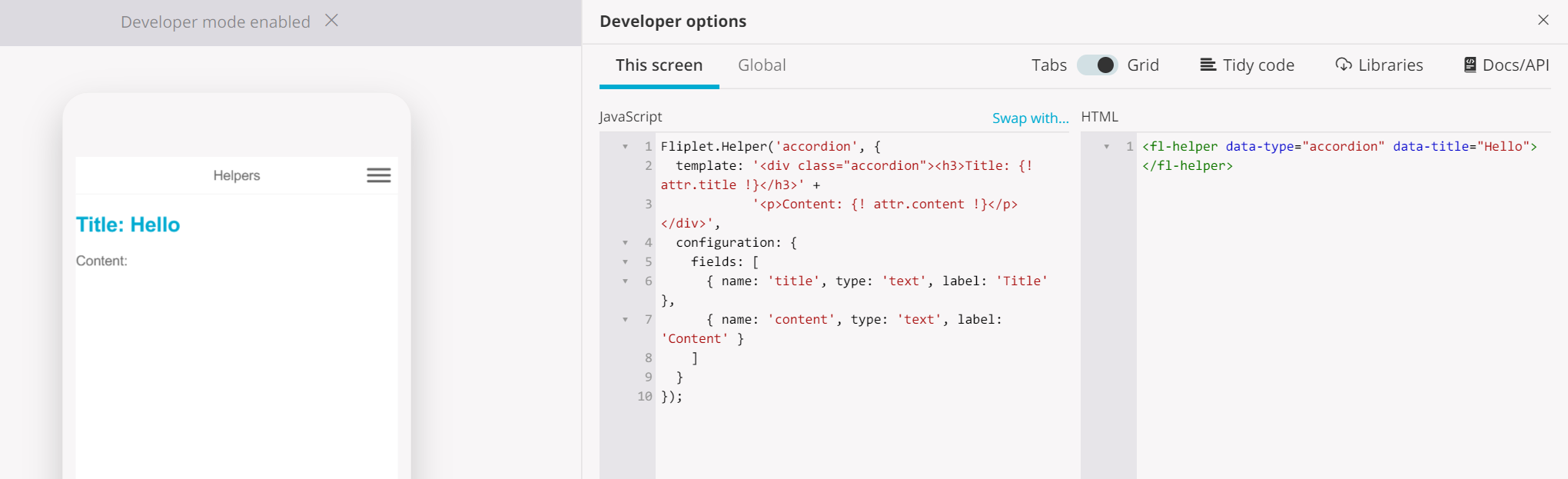
A helper in Fliplet Studio, showing the helper instance in the device preview, its JavaScript configuration and the instance in the Screen HTML.
As you might be aware of, Fliplet components are also capable of presenting the user a configuration UI to amend their settings once clicked. Helpers easily allow you to define a configuration UI within just a few seconds as you will learn in the next few chapters of the documentation.
## Sample use cases
We now know what Helpers are. The next question is "what can we use them for?"
1. Create an accordion
1. Create a decision tree
1. Creating a quiz
...and literally any other use case requiring either static or dynamic content.
---
## Further reading