---
title: Helper configuration interface
description: Define a configuration UI for your Helper so users can set field values for each instance from within Fliplet Studio.
type: api-reference
tags: [js-api, helpers, interface]
v3_relevant: true
deprecated: false
---
# Helper configuration interface
Define a configuration UI for your Helper so users can set field values for each instance from within Fliplet Studio.
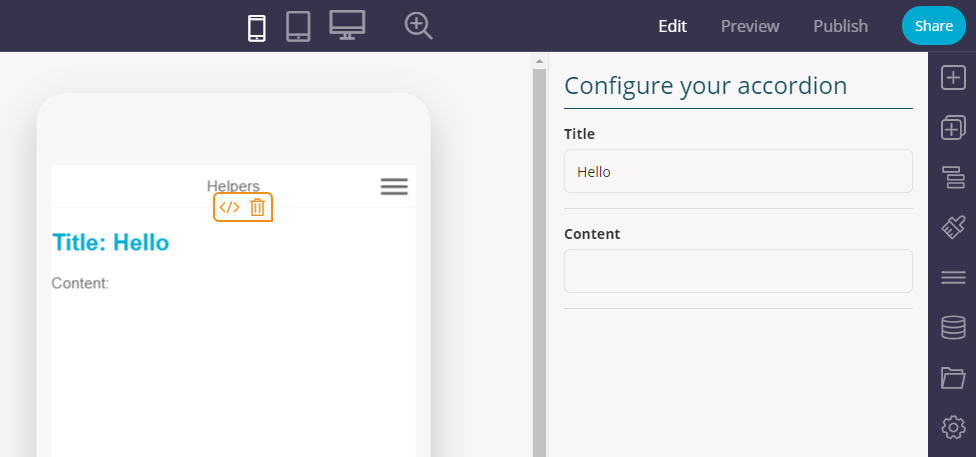
A helper in Fliplet Studio, showing its configuration interface on the right hand side.
## Define an interface
Start by adding a `configuration` object to your helper, including the list of fields to present:
```js
Fliplet.Helper({
name: 'accordion',
render: {
template: '
Title: {! fields.title !}
' +
'' +
'
Content: {! fields.content !}
'
},
configuration: {
title: 'Configure your accordion',
fields: [
{ name: 'title', type: 'text', label: 'Title' },
{ name: 'content', type: 'text', label: 'Content' }
]
}
});
```
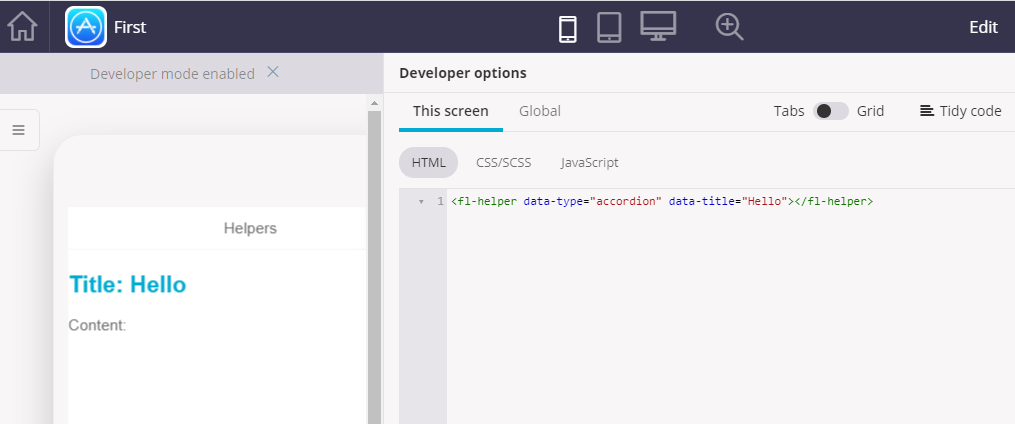
Each field can define its name, type and label. Once the user saves the configuration, the resulting values will be saved in the instance HTML, which can be seen and edited via the developer options:
---