---
title: App Actions V3
description: "Write and run JavaScript code directly on the server or client to perform automations, scheduled tasks and on-demand operations."
type: api-reference
tags: [js-api, core, app, actions]
v3_relevant: true
deprecated: false
category: automation
capabilities: [app action, server function, cloud function, automation, scheduled task, cron, on-demand task, server-side javascript, background job, action trigger, webhook handler]
---
# App Actions V3
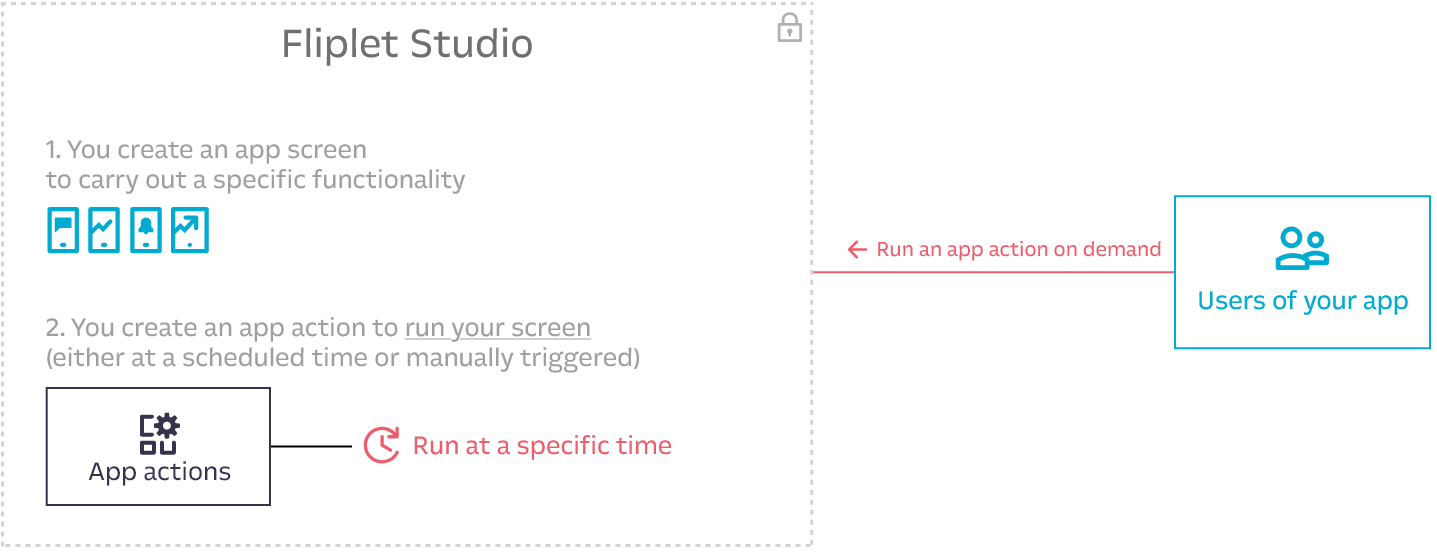
Write and run JavaScript code directly on the server or client to perform automations, scheduled tasks, and on-demand operations. Each V3 app action is a single `execute(context)` function that runs ad hoc or on a cron schedule.
## What's new in V3
- **Code-based**: Write raw JavaScript instead of configuring visual function pipelines
- **Flexible execution**: Run on server, client, or both (`any`)
- **Dependencies**: Specify Fliplet packages (e.g., `fliplet-datasources`) or external URLs
- **Scheduling**: Use cron expressions for scheduled execution
- **Triggers**: Execute on events like `manual`, `schedule`, `log`, or `analytics`
## Sample use cases
- Weekly reports on app usage via email
- Push notifications to users if users have a booking for today
- Importing RSS feeds daily and notifying users via push notifications when new items are found
- Automatically checkout all check-ins at midnight or on-demand
- Send weekly reminders for users to update their working status
- Integration with third-party tools
- Return data based on user's rights
## Data models and key concepts
1. A V3 app action consists of a unique `name`, JavaScript `code` defining an `execute(context)` function, and optional `description`, `frequency`, `timezone`, `environment`, `triggers` and `dependencies`.
2. An app action can be created as **scheduled** (when using the `frequency` parameter) or to be run **on-demand**.
3. An app action runs on the server when `environment` is set to `server` or `any`.
4. An app action runs on the client side when `environment` is set to `client` or `any`.
5. App action execution time limits depend on environment: **120 seconds** for server-side (`server`) and **30 seconds** for client-side V3 (`client`). When the limit is exceeded, the action is killed and a timeout error is returned and saved in the logs.
6. On-demand actions accept a `payload` object that is serialized to JSON and sent to the execution backend. The effective maximum payload size is constrained by the transport layer used to invoke the action (in practice, this is typically limited by the maximum URL/query-string length when the payload is sent as a URL-encoded query parameter). Keep payloads small; for larger inputs, store data elsewhere (e.g., a data source or file) and pass a reference (IDs/keys) instead.
7. The result sent from an on-demand app action is **limited to 6MB**.
8. Scheduled app actions only run the **published (production)** version of an action. On-demand actions run the version from the same environment they are fired from (e.g., Fliplet Viewer runs the master version, live apps run the production version).
9. An action must have `active` set to `true` to be executed. Inactive actions do **not** run regardless of whether they are on-demand, scheduled, or triggered by events.
10. If a scheduled action fails, the error is logged and the execution is skipped. Scheduled actions do **not** retry on failure — they wait for the next cron tick.
11. Every **create**, **update**, and **restore** snapshots the action's configuration to a **version history**. Up to **100** versions are retained per action; older snapshots are pruned automatically. Snapshotting is best-effort and never blocks the create/update response. See [Version history](#version-history).
### Execution environments
| Environment | Description | Allowed triggers |
|-------------|-------------|------------------|
| `server` | Executes on server via Lambda/Puppeteer | `schedule`, `log`, `manual` |
| `client` | Executes in user's browser | `analytics`, `manual` |
| `any` | Can execute on both server and client | All triggers |
The analytics trigger can only run in the client or any environment. Setting it on a server environment returns a TRIGGER_NOT_ALLOWED error. The schedule and log triggers can only run in the server or any environment.
### Master vs production lifecycle
Actions have two versions: **master** (development) and **production** (live).
- `create()` always creates a **master** action.
- `update()` can only update the **master** action. You can **not** update a production action directly — update the master and republish.
- `publish()` copies the current master action to production. The app itself must be published first.
- `unpublish()` removes the production version. The master version remains.
- `remove()` deletes the master action. If a production version exists, it is also deleted. You can **not** delete a production action directly.
- **Scheduled actions** (`schedule` trigger) only run the **published (production)** version.
- **On-demand actions** (`manual` trigger) run the version from the environment they are fired from (master in Fliplet Viewer, production in live apps).
- **Log-triggered actions** run the **published (production)** version on the server.
- **Analytics-triggered actions** run the version loaded in the client (production in live apps, master in Fliplet Viewer).
## Writing action code
The `code` field must contain a valid JavaScript function named `execute` that accepts a `context` parameter:
```js
async function execute(context) {
// Your action logic here
return {
// Return value (accessible when using runWithResult)
};
}
```
**Requirements:**
| Requirement | Description |
|-------------|-------------|
| Function name | Must be `execute` |
| Async | Must be declared as `async` function |
| Parameter | Must accept `context` as the first parameter |
| Return value | Should return a value/object (available via `runWithResult`) |
| Dependencies | Code using Fliplet APIs must include corresponding dependencies |
The function must be named execute. Any other name causes a CODE_VALIDATION_FAILED error. The function does not receive any parameters beyond context — all input data is inside context.payload.
Do not use Handlebars {% raw %}{{ }}{% endraw %} syntax in action code. Handlebars expressions are not evaluated inside app actions and will cause unexpected behavior or errors. Use JavaScript template literals (${}) with backtick strings instead. For example: {% raw %}`Hello ${context.payload.name}`{% endraw %}
### Supported function formats
```js
// Traditional async function declaration
async function execute(context) {
return { success: true };
}
// Arrow function with const
const execute = async (context) => {
return { success: true };
};
// Arrow function with let
let execute = async (context) => {
return { success: true };
};
// Async function expression
const execute = async function(context) {
return { success: true };
};
```
### Context object
The `context` parameter is an object with a single property: `payload`. The `context` object does **not** contain any other properties — no `appId`, no `userId`, no `environment`. All input data comes through `context.payload`.
The contents of `context.payload` differ by trigger type. See the detailed breakdown below.
#### `context.payload` for `manual` trigger
Contains whatever object you pass as the second argument to `run()` or `runWithResult()`. If you do not pass a payload, `context.payload` is an empty object `{}`.
```js
// When called with:
// Fliplet.App.V3.Actions.runWithResult('confirm-booking', { entryId: 123, name: 'Nick' })
async function execute(context) {
// context.payload is exactly: { entryId: 123, name: 'Nick' }
const entryId = context.payload.entryId; // 123
const name = context.payload.name; // 'Nick'
return { received: true };
}
```
#### `context.payload` for `schedule` trigger
An empty object `{}`. Scheduled actions do **not** receive any input data. If your scheduled action needs data, fetch it from a data source or external API inside the `execute` function.
```js
async function execute(context) {
// context.payload is: {}
// There is no data passed to scheduled actions — fetch what you need:
const connection = await Fliplet.DataSources.connect(158);
const entries = await connection.find();
return { count: entries.length };
}
```
#### `context.payload` for `log` trigger
Contains the trigger type and the full log entry object that matched the `where` filter. The payload has this exact structure:
```js
// context.payload structure for log triggers:
{
"trigger": "log", // Always the string "log"
"log": { // The full log entry object
"id": 182175045, // Number — unique log entry ID
"userId": 409996, // Number — ID of the user who caused the event
"appId": 445423, // Number — ID of the app
"organizationId": 2845, // Number — ID of the organization
"dataSourceId": 1735533, // Number — ID of the data source (for data source events)
"dataSourceEntryId": 413923630, // Number — ID of the entry (for entry-level events)
"appNotificationId": null, // Number or null — notification ID if applicable
"sessionId": 10563550, // Number — session ID
"requestId": "f0058980-1def-11f1-a60f-4d7c40bda5b0", // String — unique request ID
"type": "dataSource.entry.create", // String — the log event type
"data": { // Object — event-specific data
"columns": ["Department"],
"_userEmail": "nick@company.com"
},
"dataString": "{\"columns\": [\"Department\"], \"_userEmail\": \"nick@company.com\"}", // String — JSON-stringified version of data
"createdAt": "2026-03-12T08:46:18.813Z", // String (ISO 8601)
"updatedAt": "2026-03-12T08:46:18.813Z" // String (ISO 8601)
}
}
```
Example usage:
```js
async function execute(context) {
// Access the log entry that triggered this action
const logEntry = context.payload.log;
// logEntry.type tells you what event occurred
const eventType = logEntry.type; // e.g., 'dataSource.entry.create'
// logEntry.data contains event-specific details
const userEmail = logEntry.data._userEmail;
// logEntry.dataSourceEntryId is the ID of the created/updated/deleted entry
const entryId = logEntry.dataSourceEntryId;
return { eventType: eventType, entryId: entryId };
}
```
#### `context.payload` for `analytics` trigger
Contains the analytics event that matched the `where` filter. The payload has this exact structure:
```js
// context.payload structure for analytics triggers:
{
"createdAt": 1773305212383, // Number — Unix timestamp in milliseconds
"type": "analytics.pageView", // String — the analytics event type
"data": { // Object — event-specific data
"_pageTitle": "Employee Directory", // String — title of the screen
"_platform": "web", // String — "web" or "native"
"_os": "Win32", // String — operating system
"_analyticsSessionId": "f6de95cb-e69b-5dca-2114-cc3961d379b2", // String (UUID)
"_pageId": 1908950, // Number — screen ID
"_deviceTrackingId": "3304672d-5d25-4a01-248a-03e4286f42db" // String (UUID)
}
}
```
The analytics trigger payload does not include a trigger field like the log trigger does. The payload is the event object itself, not wrapped in a container.
Example usage:
```js
async function execute(context) {
// Access analytics event data directly from context.payload
const eventType = context.payload.type; // 'analytics.pageView'
const screenTitle = context.payload.data._pageTitle; // 'Employee Directory'
const screenId = context.payload.data._pageId; // 1908950
const platform = context.payload.data._platform; // 'web'
return { screenTitle: screenTitle, screenId: screenId };
}
```
### Example: simple action
```js
async function execute(context) {
return { message: 'Hello World', timestamp: Date.now() };
}
```
### Example: action with data source
```js
async function execute(context) {
// context.payload.filters is passed by the caller via run() or runWithResult()
const connection = await Fliplet.DataSources.connect(158);
const result = await connection.find({
where: context.payload.filters
});
return {
success: true,
count: result.length,
result: result
};
}
// Requires dependency: fliplet-datasources
```
### Example: send an email
```js
async function execute(context) {
var recipientEmail = 'nick@company.com'; // replace with your recipient email
var recipientName = 'Nick'; // replace with your recipient name
await Fliplet.Communicate.sendEmail({
to: [{ email: recipientEmail, name: recipientName, type: 'to' }],
subject: 'Your booking is confirmed',
from_name: 'Booking System',
html: 'Booking Confirmed
Hi ' + recipientName + ', your booking has been confirmed.
'
});
return { success: true, sentTo: recipientEmail };
}
// Requires dependency: fliplet-communicate
```
### Example: send a push notification
```js
async function execute(context) {
// Send a push notification to all subscribed users
var notification = await Fliplet.Notifications.insert({
status: 'published',
data: {
title: 'Daily Update',
message: 'Your daily report is ready to view.',
navigate: { action: 'screen', page: 54321 } // replace 54321 with your screen ID
},
pushNotification: {
payload: {
title: 'Daily Update',
body: 'Your daily report is ready to view.'
}
}
});
return { success: true, notificationId: notification.id };
}
// Requires dependency: fliplet-notifications
```
## Dependencies
If your action code uses Fliplet APIs, you must include the corresponding package in the `dependencies` array. Dependencies can be Fliplet package names or external URLs.
```js
dependencies: [
'fliplet-datasources',
'fliplet-media',
'https://cdnjs.cloudflare.com/ajax/libs/moment.js/2.30.1/moment.min.js'
]
```
When your code uses any Fliplet API (e.g., Fliplet.DataSources), the corresponding package must be listed in the dependencies array. Omitting a required dependency causes a CODE_VALIDATION_FAILED error. The system does not auto-detect dependencies from your code.
### Common Fliplet packages
| Package | Required when using | Description | API Reference |
|---------|---------------------|-------------|---------------|
| `fliplet-datasources` | `Fliplet.DataSources` | Data Sources API — connect, find, insert, update, remove entries | [Data Sources JS API](https://developers.fliplet.com/API/fliplet-datasources.html) |
| `fliplet-media` | `Fliplet.Media` | Media API — upload, retrieve, and manage media files | [Media JS API](https://developers.fliplet.com/API/fliplet-media.html) |
| `fliplet-communicate` | `Fliplet.Communicate` | Communication API — send emails, push notifications, SMS | [Communicate JS API](https://developers.fliplet.com/API/fliplet-communicate.html) |
| `fliplet-barcode` | `Fliplet.Barcode` | Barcode API — generate and scan barcodes | [Barcode JS API](https://developers.fliplet.com/API/fliplet-barcode.html) |
| `fliplet-audio` | `Fliplet.Audio` | Audio API — record and play audio | [Audio JS API](https://developers.fliplet.com/API/fliplet-audio.html) |
| `fliplet-csv` | `Fliplet.CSV` | CSV API — parse and generate CSV data | [CSV JS API](https://developers.fliplet.com/API/fliplet-csv.html) |
| `fliplet-encryption` | `Fliplet.Encryption` | Encryption API — encrypt and decrypt data | [Encryption JS API](https://developers.fliplet.com/API/fliplet-encryption.html) |
| `fliplet-notifications` | `Fliplet.Notifications` | Notifications API — manage and send push notifications | [Notifications JS API](https://developers.fliplet.com/API/fliplet-notifications.html) |
### Quick reference: key method signatures
**`fliplet-datasources`** — [Full API reference](https://developers.fliplet.com/API/fliplet-datasources.html)
```js
var connection = await Fliplet.DataSources.connect(dataSourceId);
var connection = await Fliplet.DataSources.connectByName("DataSourceName");
var records = await connection.find({ where: { Column: 'value' } });
var record = await connection.findById(entryId);
var record = await connection.findOne({ where: { Column: 'value' } });
await connection.insert({ Column: 'value', Column2: 'value2' });
await connection.update(entryId, { Column: 'newValue' });
await connection.removeById(entryId);
await connection.commit({ entries: arrayOfObjects }); // bulk replace all entries
```
**`fliplet-communicate`** — [Full API reference](https://developers.fliplet.com/API/fliplet-communicate.html)
```js
// Send email
await Fliplet.Communicate.sendEmail({
to: [{ email: 'user@example.com', name: 'User', type: 'to' }],
subject: 'Subject line',
from_name: 'Sender Name',
html: 'Email body HTML
'
});
// Send SMS
await Fliplet.Communicate.sendSMS({
data: { to: '+123456789', body: 'Message text' }
});
// Send push notification (only app publishers/editors can send)
await Fliplet.Communicate.sendPushNotification(appId, {
title: 'Notification title',
body: 'Notification message',
sandbox: false // true = only Fliplet Viewer users (testing)
});
```
**`fliplet-notifications`** — [Full API reference](https://developers.fliplet.com/API/fliplet-notifications.html)
```js
// Send a push notification to all users subscribed to the app
var notification = await Fliplet.Notifications.insert({
status: 'published',
data: {
title: 'Booking Reminder',
message: 'You have a booking scheduled for today.',
navigate: { action: 'screen', page: 54321 } // replace 54321 with your screen ID
},
pushNotification: {
payload: {
title: 'Booking Reminder',
body: 'You have a booking scheduled for today.'
}
}
});
// notification — the created notification object
```
**`fliplet-media`** — [Full API reference](https://developers.fliplet.com/API/fliplet-media.html)
```js
var response = await Fliplet.Media.Folders.get({ folderId: folderId });
// response.files, response.folders
await Fliplet.Media.Files.upload({ folderId: folderId, file: fileBlob });
```
### Dependency auto-selection rule
When writing action code, **match each `Fliplet.*` namespace used in the `execute` function to its corresponding package** and include it in the `dependencies` array:
- Code uses `Fliplet.DataSources` → add `fliplet-datasources`
- Code uses `Fliplet.Communicate` → add `fliplet-communicate`
- Code uses `Fliplet.Media` → add `fliplet-media`
- Code uses `Fliplet.Barcode` → add `fliplet-barcode`
- Code uses `Fliplet.Audio` → add `fliplet-audio`
- Code uses `Fliplet.CSV` → add `fliplet-csv`
- Code uses `Fliplet.Encryption` → add `fliplet-encryption`
- Code uses `Fliplet.Notifications` → add `fliplet-notifications`
If the code uses multiple Fliplet APIs, include all corresponding packages. For example, code that reads from a data source and sends an email needs both `fliplet-datasources` and `fliplet-communicate`.
For external libraries, you can use any URL from the [Fliplet approved libraries](https://developers.fliplet.com/Fliplet-approved-libraries#fliplet-approved-libraries) list in the `dependencies` array.
## Action triggers
An action can be triggered by a system event or manually. Configure triggers using the `triggers` property, which accepts an array of trigger configuration objects.
### Trigger object structure
Each trigger in the `triggers` array is an object with these properties:
| Property | Type | Required | Description |
|----------|------|----------|-------------|
| `trigger` | String | Yes | One of: `manual`, `schedule`, `log`, `analytics` |
| `where` | Object | Required for `log` and `analytics`. Not used for `manual` or `schedule`. | Filter object specifying which events should trigger the action |
### Trigger types
| Trigger | Allowed environments | Description |
|---------|---------------------|-------------|
| `manual` | `server`, `client`, `any` | Triggered programmatically via `run()` or `runWithResult()` |
| `schedule` | `server`, `any` | Triggered automatically by the cron schedule defined in `frequency`. Does **not** work with `client` environment. |
| `log` | `server`, `any` | Triggered automatically when an app log event matches the `where` filter. Does **not** work with `client` environment. |
| `analytics` | `client`, `any` | Triggered automatically in the user's browser when an analytics event matches the `where` filter. Does **not** work with `server` environment. |
### `manual` trigger
The `manual` trigger has no `where` clause. It fires when you call `run()` or `runWithResult()`.
```js
triggers: [{ trigger: 'manual' }]
```
### `schedule` trigger
The `schedule` trigger has no `where` clause. It fires according to the cron expression in `frequency`. The `frequency` and `timezone` parameters must be set on the action itself (not inside the trigger object).
```js
triggers: [{ trigger: 'schedule' }]
// Also requires: frequency: '0 8 * * 1', timezone: 'Europe/London'
```
### `log` trigger
The `log` trigger fires when an app log event matches the `where` filter. The `where` object supports these fields:
| Field | Type | Description |
|-------|------|-------------|
| `type` | String | The log event type to match (see full list below) |
| `dataSourceId` | Number | Filter to logs for a specific data source (applicable to `dataSource.*` event types) |
```js
triggers: [
{
trigger: 'log',
where: {
type: 'dataSource.entry.create',
dataSourceId: 177
}
}
]
```
Log-triggered actions are scoped to the appId of the app that owns the action. The action only fires for log events that belong to the same app. It does not receive log events from other apps in the organization, even if the where filter matches.
#### Available log event types
The full list of log event types is documented at [Organization audit log types](https://developers.fliplet.com/Organization-audit-log-types.html#logs-from-fliplet-apps).
**Communication events:**
| Type | Description |
|------|-------------|
| `sms.2fa` | An SMS was sent because of 2FA login |
| `sms.communicate` | An SMS was sent via JS APIs |
| `sms.dataSourceHook` | An SMS was sent from a data source hook |
| `sms.validate` | An SMS was sent because of a data source login |
| `email.communicate` | An email was sent via Communicate JS APIs |
| `email.delivered` | An email was delivered to the target recipient |
| `email.delayed` | An email was delayed and could not be delivered yet |
| `email.bounced` | An email was bounced back and could not be delivered |
| `email.complaint` | A complaint was received when attempting to deliver the email |
| `email.rejected` | An email was not delivered due to the recipient server rejecting it |
| `email.dataSourceHook` | An email was sent from a data source hook |
| `email.validate` | An email was sent because of a data source login |
**App analytics events:**
| Type | Description |
|------|-------------|
| `app.analytics.event` | Analytics event logged from app |
| `app.analytics.pageView` | Screen view logged from app |
| `app.update` | An app user is checking for published app updates |
| `app.view` | Screen viewed from web app |
**Data source events:**
| Type | Description |
|------|-------------|
| `dataSource.entry.create` | A data source entry was created |
| `dataSource.entry.update` | A data source entry was updated |
| `dataSource.entry.delete` | A data source entry was deleted |
| `dataSource.event` | A custom event on a data source (unused) |
| `dataSource.import` | A data source was overwritten via the import JS API |
**Media events:**
| Type | Description |
|------|-------------|
| `mediaFile.create` | A media file was created (uploaded) |
**Session events:**
| Type | Description |
|------|-------------|
| `session.locale.updated` | The current user switched language settings to a new locale |
**AI service events:**
| Type | Description |
|------|-------------|
| `ai.completions` | AI text completion or chat completion was requested |
| `ai.image` | AI image generation was requested |
| `ai.audio` | AI audio transcription was requested |
| `ai.embeddings` | AI text embeddings were created |
### `analytics` trigger
The `analytics` trigger fires on the client side when an analytics event matches the `where` filter. The `where` object supports these fields:
| Field | Type | Description |
|-------|------|-------------|
| `type` | String | The analytics event type to match (see table below) |
| `data` | Object | Optional sub-filter on the event data fields (e.g., `{ _pageId: 77 }`) |
```js
triggers: [
{
trigger: 'analytics',
where: {
type: 'analytics.pageView',
data: {
_pageId: 9535
}
}
}
]
```
To trigger on **all** screen views (not filtered to a specific screen), omit the `data` field:
```js
triggers: [
{
trigger: 'analytics',
where: {
type: 'analytics.pageView'
}
}
]
```
#### Available analytics event types
| Type | Description |
|------|-------------|
| `analytics.pageView` | A screen was viewed in the app |
| `analytics.event` | A custom analytics event tracked via `Fliplet.App.Analytics.event()` |
#### Analytics `data` fields for `analytics.pageView`
| Field | Type | Description |
|-------|------|-------------|
| `_pageTitle` | String | Title of the screen that was viewed |
| `_platform` | String | Platform: `"web"` or `"native"` |
| `_os` | String | Operating system (e.g., `"Win32"`, `"MacIntel"`) |
| `_analyticsSessionId` | String (UUID) | Unique session ID for analytics tracking |
| `_pageId` | Number | ID of the screen that was viewed |
| `_deviceTrackingId` | String (UUID) | Unique device tracking identifier |
### Multiple triggers on one action
An action can have multiple triggers. For example, an action that can be triggered both manually and by analytics events:
```js
triggers: [
{
trigger: 'manual'
},
{
trigger: 'analytics',
where: {
type: 'analytics.pageView',
data: {
_pageId: 9535
}
}
}
]
```
## Create an action
Use `Fliplet.App.V3.Actions.create()` to create a V3 action. This always creates a **master** (development) version. To run the action in production/live apps, you must also publish it using `publish()`.
### Parameters
| Parameter | Type | Required | Default | Description |
|-----------|------|----------|---------|-------------|
| `name` | String | Yes | — | Unique name for the action. Only letters, numbers, dashes and underscores. Max 255 characters. Example: `send-weekly-report` |
| `code` | String | Yes | — | JavaScript code defining an `async function execute(context)` function |
| `description` | String | No | `null` | Free-text description of the action's purpose. Max 1000 characters. Use this for clarity and management of actions in the UI and API responses. |
| `active` | Boolean | No | `false` | Whether the action is enabled. Must be `true` for the action to execute |
| `environment` | String | No | `"server"` | Execution environment: `"server"`, `"client"`, or `"any"` |
| `triggers` | Array | No | `[]` | Array of trigger configuration objects |
| `dependencies` | Array | No | `[]` | Array of Fliplet package names (strings) or external URLs (strings) |
| `frequency` | String | No | `null` | Cron expression for scheduled execution (e.g., `"0 5 * * *"`) |
| `timezone` | String | No | `null` | IANA timezone name (e.g., `"America/New_York"`). See [full list](https://en.wikipedia.org/wiki/List_of_tz_database_time_zones) |
### Return value
Returns a Promise that resolves to the created **action object** directly (not wrapped in `{ action }`). See [Action object structure](#action-object-structure) for the full shape.
### Frequency (cron expression)
```
┌───────────── minute (0 - 59)
│ ┌───────────── hour (0 - 23)
│ │ ┌───────────── day of the month (1 - 31)
│ │ │ ┌───────────── month (1 - 12)
│ │ │ │ ┌───────────── day of the week (0 - 6) (Sunday to Saturday)
│ │ │ │ │
│ │ │ │ │
│ │ │ │ │
* * * * *
```
| Frequency | Description |
|-------------------|--------------------------------------------------------------------------------------------------------|
| `1 0 * * *` | Run at one minute past midnight (00:01) every day |
| `0 * * * *` | Run once an hour at the beginning of the hour |
| `0 0 1 * *` | Run once a month at midnight of the first day of the month |
| `0 0 * * 0` | Run once a week at midnight on Sunday morning |
| `45 23 * * 6` | Run at 23:45 (11:45PM) every Saturday |
| `*/5 1 * * *` | Run every 5th minute of every first hour (i.e., 01:00, 01:05, 01:10, up until 01:55) |
| `0 0 1 1 *` | Run once a year at midnight of 1 January |
Running every minute (* * * * *) is not allowed and returns a FREQUENCY_TOO_FREQUENT error.
The timezone for the frequency is defined via the timezone parameter using the full IANA timezone name, e.g., "Europe/Dublin". If no timezone is specified, the server default is used.
Example timezones:
- `America/Los_Angeles`
- `America/New_York`
- `Europe/Dublin`
- `Europe/London`
- `Europe/Rome`
The active parameter defaults to false. You must set active: true when creating an action, otherwise the action will not execute on any trigger (manual, schedule, log, or analytics).
### Create a scheduled action
A scheduled action requires: `frequency` (cron expression), `triggers: [{ trigger: 'schedule' }]`, and `environment` set to `"server"` or `"any"`. The action only runs in production after being published with `publish()`.
```js
var result = await Fliplet.App.V3.Actions.create({
name: 'send-monday-weekly-reminder',
code: `async function execute(context) {
// context.payload is {} for scheduled actions — no data is passed
const connection = await Fliplet.DataSources.connect(158);
const entries = await connection.find();
// Send reminder to each entry...
return { success: true, count: entries.length };
}`,
active: true,
environment: 'server',
frequency: '0 8 * * 1', // Every Monday at 8:00 AM
timezone: 'Europe/Rome',
triggers: [{ trigger: 'schedule' }],
dependencies: ['fliplet-datasources']
});
// result — the created action object (returned directly, not wrapped)
// result.id — use this ID to publish, update, or delete the action
// IMPORTANT: You must publish the action for the schedule to be active in production:
// await Fliplet.App.V3.Actions.publish(result.id);
```
### Create an on-demand (manual) action
To run an action on-demand (e.g., triggered by a user), you must include the manual trigger. Without it, run() and runWithResult() cannot execute the action.
```js
var result = await Fliplet.App.V3.Actions.create({
name: 'confirm-booking',
description: 'Marks a booking as confirmed and notifies the customer',
code: `async function execute(context) {
// context.payload contains whatever was passed to run() or runWithResult()
// e.g., { entryId: 123, name: 'Nick' }
const connection = await Fliplet.DataSources.connect(158);
await connection.update(context.payload.entryId, {
Status: 'Confirmed',
ConfirmedBy: context.payload.name
});
return { success: true };
}`,
active: true,
environment: 'server',
triggers: [{ trigger: 'manual' }],
dependencies: ['fliplet-datasources']
});
// result — the created action object (returned directly, not wrapped)
// result.id — use this ID to run, publish, update, or delete
```
The `description` parameter is optional — actions can be created without it, in which case `description` is `null` on the returned action object.
### Create an action with a log trigger
The log trigger can only run in the server or any environment. Setting it on a client environment returns a TRIGGER_NOT_ALLOWED error.
A log-triggered action fires automatically when an app log event matches the `where` filter. The full log entry is available in `context.payload.log`.
```js
var result = await Fliplet.App.V3.Actions.create({
name: 'notify-on-new-entry',
code: `async function execute(context) {
// context.payload.trigger is always "log"
// context.payload.log contains the full log entry
var logEntry = context.payload.log;
var entryId = logEntry.dataSourceEntryId; // ID of the created entry
var userEmail = logEntry.data._userEmail; // Email of the user who created it
// Example: send a notification or update another data source
var connection = await Fliplet.DataSources.connect(200);
await connection.insert({
Event: 'New entry created',
EntryId: entryId,
CreatedBy: userEmail,
SourceDataSourceId: logEntry.dataSourceId,
Timestamp: logEntry.createdAt
});
return { success: true, entryId: entryId };
}`,
active: true,
environment: 'server',
triggers: [
{
trigger: 'log',
where: {
type: 'dataSource.entry.create',
dataSourceId: 177
}
}
],
dependencies: ['fliplet-datasources']
});
// result — the created action object (returned directly, not wrapped)
// The action fires when a new entry is created in data source 177
// IMPORTANT: You must publish the action for the log trigger to be active in production
```
### Create a client-side action with analytics trigger
The analytics trigger can only run in the client or any environment. Setting it on a server environment returns a TRIGGER_NOT_ALLOWED error.
An analytics-triggered action fires automatically in the user's browser when an analytics event matches the `where` filter. The analytics event data is available directly in `context.payload` (not wrapped in a sub-object).
```js
var result = await Fliplet.App.V3.Actions.create({
name: 'track-employee-directory-visit',
code: `async function execute(context) {
// context.payload contains the analytics event directly:
// { createdAt: 1773305212383, type: 'analytics.pageView', data: { ... } }
var screenTitle = context.payload.data._pageTitle; // 'Employee Directory'
var screenId = context.payload.data._pageId; // 1908950
var platform = context.payload.data._platform; // 'web' or 'native'
console.log('Screen visited:', screenTitle, 'on', platform);
return { tracked: true, screenId: screenId };
}`,
active: true,
environment: 'client',
triggers: [
{
trigger: 'analytics',
where: {
type: 'analytics.pageView',
data: {
_pageId: 77
}
}
}
]
});
// result — the created action object (returned directly, not wrapped)
// The action fires in the user's browser when screen 77 is visited
```
## Run an on-demand action
Actions with a `manual` trigger can be executed using `run()` (fire and forget) or `runWithResult()` (wait for the return value). Pass the action `name` (String) or `id` (Number) as the first parameter.
Only actions with a manual trigger can be run via run() or runWithResult(). Calling these methods on an action without a manual trigger results in an error. The action must also have active: true.
### `run(nameOrId, payload)` — fire and forget
Queues the action for execution and returns immediately. You do **not** get the return value of `execute()`.
- **Parameters:**
- `nameOrId` (String or Number) — The action name or numeric ID
- `payload` (Optional Object) — Data to pass as `context.payload`.
- **Returns:** Promise that resolves when the action has been **queued** (not when it finishes executing).
```js
// Run without payload
await Fliplet.App.V3.Actions.run('confirm-booking');
// Run with payload
await Fliplet.App.V3.Actions.run('confirm-booking', {
entryId: 123,
name: 'Nick'
});
// The action has been queued for processing
// No result is returned — use runWithResult() if you need the return value
```
### `runWithResult(nameOrId, payload)` — wait for result
Executes the action and waits for it to complete. Returns the value from the `execute()` function.
- **Parameters:**
- `nameOrId` (String or Number) — The action name or numeric ID
- `payload` (Optional Object) — Data to pass as `context.payload`.
- **Returns:** Promise that resolves with the return value of the `execute()` function. The result is limited to 6MB.
```js
// Run and get the result
var result = await Fliplet.App.V3.Actions.runWithResult('confirm-booking', {
entryId: 123,
name: 'Nick'
});
// result is exactly what execute() returned
// e.g., { success: true }
if (result.success) {
// Booking confirmed
}
// Run by action ID instead of name
var result = await Fliplet.App.V3.Actions.runWithResult(12345, {
entryId: 123
});
// result is the return value of execute()
```
Rate limiting: the run action endpoint is limited to 30 requests per minute. Contact the Fliplet team for more details.
Payload size limit: the input payload is serialized to JSON and sent to the execution backend. The effective maximum size is constrained by the transport/infrastructure (commonly the maximum URL/query-string length if the payload is passed as a URL-encoded query parameter). Keep payloads small and pass references (IDs/keys) for large inputs.
The result is limited to 6MB.
## Get the list of app actions
Use `Fliplet.App.V3.Actions.get()` to fetch V3 app actions.
### Parameters
| Parameter | Type | Required | Default | Description |
|-----------|------|----------|---------|-------------|
| `limit` | Number | No | 50 | Maximum number of actions to return |
| `offset` | Number | No | 0 | Number of actions to skip (for pagination) |
### Return value
Returns a Promise resolving to:
| Property | Type | Description |
|----------|------|-------------|
| `actions` | Array | Array of action objects |
| `pagination` | Object | Pagination metadata |
| `pagination.total` | Number | Total number of actions |
| `pagination.hasMore` | Boolean | Whether more actions exist beyond the current page |
```js
var result = await Fliplet.App.V3.Actions.get();
// result.actions — Array of action objects
// result.pagination — { total: Number, hasMore: Boolean }
result.actions.forEach(function (action) {
console.log(action.id, action.name, action.active);
});
// With pagination
var result = await Fliplet.App.V3.Actions.get({
limit: 10,
offset: 0
});
console.log('Total actions:', result.pagination.total);
console.log('Has more:', result.pagination.hasMore);
```
### Action object structure
Every API method that returns an action uses this structure for the action object itself. The methods differ only in how the object is wrapped: `getById`, `create`, and `update` resolve to the action object **directly**; `get` returns it inside the `actions` array; `publish` returns it under an `action` property.
```json
{
"id": 12345,
"appId": 67890,
"name": "confirm-booking",
"description": "Marks a booking as confirmed and notifies the customer",
"code": "async function execute(context) { return { success: true }; }",
"active": true,
"environment": "server",
"actionVersion": "v3",
"triggers": [{"trigger": "manual"}],
"dependencies": ["fliplet-datasources"],
"assets": [
{
"name": "fliplet-datasources",
"url": "https://cdn.fliplet.com/assets/fliplet-datasources/1.0/datasources.js",
"path": "assets/fliplet-datasources/1.0/datasources.js"
}
],
"frequency": null,
"timezone": null,
"lastRunAt": "2024-01-15T10:30:00.000Z",
"createdAt": "2024-01-01T00:00:00.000Z",
"updatedAt": "2024-01-15T10:30:00.000Z"
}
```
| Field | Type | Description |
|-------|------|-------------|
| `id` | Number | Unique action ID. Use this for `update()`, `remove()`, `publish()`, `unpublish()`, `run()`, `runWithResult()` |
| `appId` | Number | ID of the app this action belongs to |
| `name` | String | Unique action name within the app |
| `description` | String or null | Free-text description set on the action, or `null` if not set |
| `code` | String | The JavaScript source code |
| `active` | Boolean | Whether the action is enabled |
| `environment` | String | `"server"`, `"client"`, or `"any"` |
| `actionVersion` | String | Always `"v3"` for V3 actions |
| `triggers` | Array | Array of trigger configuration objects |
| `dependencies` | Array | Array of dependency package names or URLs as provided during creation |
| `assets` | Array | Resolved asset URLs for each dependency (read-only, populated by the system). Each asset has `name` (String), `url` (String), and `path` (String) |
| `frequency` | String or null | Cron expression if scheduled, otherwise `null` |
| `timezone` | String or null | IANA timezone name if set, otherwise `null` |
| `lastRunAt` | String (ISO 8601) or null | Timestamp of the last execution, or `null` if never run |
| `createdAt` | String (ISO 8601) | Timestamp when the action was created |
| `updatedAt` | String (ISO 8601) | Timestamp when the action was last updated |
## Get a single action
Use `Fliplet.App.V3.Actions.getById()` to retrieve a single V3 action by its ID.
- **Parameters:** `id` (Number) — The action ID
- **Returns:** Promise resolving to the **action object** directly (not wrapped in `{ action }`)
```js
var result = await Fliplet.App.V3.Actions.getById(12345);
// result — the action object (see Action object structure above)
console.log(result.name); // 'confirm-booking'
console.log(result.active); // true
```
## Update an action
Use `Fliplet.App.V3.Actions.update()` to update any property of the **master** action. You can update `name`, `code`, `description`, `active`, `environment`, `triggers`, `dependencies`, `frequency`, and `timezone`. Include only the properties you want to change — omitted properties remain unchanged. Pass `description: null` (or an empty string) to clear an existing description.
- **Parameters:**
- `id` (Number) — The action ID (must be the master action, not the production version)
- `data` (Object) — Object with properties to update
- **Returns:** Promise resolving to the updated **action object** directly (not wrapped in `{ action }`)
You can not update a published (production) action directly. Update the master action and call publish() again to push changes to production.
```js
var result = await Fliplet.App.V3.Actions.update(12345, {
name: 'confirm-booking-v2',
code: `async function execute(context) {
return { updated: true };
}`,
active: true,
environment: 'server',
triggers: [{ trigger: 'manual' }],
dependencies: []
});
// result — the updated action object (returned directly, not wrapped)
// If this action is published, you must call publish() again to push the changes to production
```
## Temporarily deactivate an action
Update an action with `active: false` to disable it. Inactive actions do **not** run on any trigger (manual, schedule, log, or analytics). To reactivate, set `active: true` and republish if needed.
```js
var result = await Fliplet.App.V3.Actions.update(12345, {
active: false
});
// Action is now inactive — it will not run until active is set back to true
```
## Delete an action
Use `Fliplet.App.V3.Actions.remove()` to delete an action. This deletes the master action. If a production version exists, it is also deleted.
- **Parameters:** `id` (Number) — The action ID (must be the master action)
- **Returns:** Promise that resolves when the action has been deleted
You can not delete a production action directly. Delete the master action instead, which also removes the production version.
```js
await Fliplet.App.V3.Actions.remove(12345);
// Both master and production versions have been deleted
```
## Publish an action
Use `Fliplet.App.V3.Actions.publish()` to copy the master action to production. Only published actions run in live apps. The app itself must be published first.
- **Parameters:** `id` (Number) — The action ID
- **Returns:** Promise resolving to `{ action: }`
```js
var result = await Fliplet.App.V3.Actions.publish(12345);
// result.action — the published production action object
```
If the app has not been published, publish() returns an APP_NOT_PUBLISHED error. Publish the app first, then publish the action.
## Unpublish an action
Use `Fliplet.App.V3.Actions.unpublish()` to remove an action from production. The master version remains and can be republished later.
- **Parameters:** `id` (Number) — The action ID
- **Returns:** Promise that resolves when the action has been unpublished
```js
await Fliplet.App.V3.Actions.unpublish(12345);
// The action no longer runs in live apps
// The master version still exists and can be edited and republished
```
## Version history
Every time a V3 action is **created**, **updated**, or **restored**, the platform stores a snapshot of its configuration in a version history. This lets you browse how an action changed over time and roll back to an earlier configuration.
Version history is accessed through the REST API. Call the endpoints directly, or from app code via [`Fliplet.API.request()`](https://developers.fliplet.com/API/core/api.html). All examples below use `Fliplet.API.request()`.
The endpoints are served from your region's API host, the same hosts used elsewhere:
- `EU` `https://api.fliplet.com`
- `US` `https://us.api.fliplet.com`
- `CA` `https://ca.api.fliplet.com`
All three endpoints require **editor** permissions on the **master** app, and the action must be a V3 action.
### How snapshots are created
| When | `action` value on the snapshot |
|------|--------------------------------|
| `create()` | `create` |
| `update()` | `update` |
| `restore` (before applying the old config) | `pre-restore` |
- Snapshots are taken **after** the create/update succeeds. If snapshotting itself fails, the error is logged to the platform's error tracking but the API still returns success — versioning never blocks a write.
- A maximum of **100** snapshots are kept per action. When a new snapshot pushes the count over 100, the **oldest** snapshots are pruned.
- Restoring an action first takes a `pre-restore` snapshot of the current configuration, so a restore is itself undo-able (restore the `pre-restore` version to get back to where you were).
- Deleting an action cascades to its version history — all snapshots for that action are removed.
### What a snapshot contains
Each snapshot stores the full action configuration at that point in time:
`name`, `description`, `active`, `frequency`, `timezone`, `triggers`, `environment`, `code`, `actionVersion`, `dependencies`, `assets`, plus the internal `functions`, `widgetInstanceIds`, `masterTaskId`, and `productionTaskId` fields. For V3 actions, `functions` and `widgetInstanceIds` are empty. The snapshot also records the `action` reason (`create`, `update`, or `pre-restore`).
### List version history
Returns the snapshots for an action, most recent first. The list payload is a lightweight **summary** — only the fields listed in the table below are included; all other fields (`code`, `dependencies`, `assets`, `timezone`, `triggers`, `functions`, `widgetInstanceIds`, `masterTaskId`, `productionTaskId`, `actionVersion`) are omitted. Fetch a single version to get the full snapshot.
```
GET /v3/apps/:appId/actions/:actionId/versions
```
**Query parameters:**
| Parameter | Type | Required | Default | Description |
|-----------|------|----------|---------|-------------|
| `limit` | Number | No | 50 | Maximum number of versions to return (max 100) |
| `offset` | Number | No | 0 | Number of versions to skip (for pagination) |
**Summary fields returned per version:**
| Field | Type | Description |
|-------|------|-------------|
| `id` | Number | Unique version ID. Use this with the get/restore endpoints |
| `createdAt` | String (ISO 8601) | When the snapshot was taken |
| `userId` | Number or null | ID of the user who triggered the snapshot |
| `user` | Object or null | `{ id, firstName, lastName, email }` of that user, when available |
| `action` | String | Reason for the snapshot: `create`, `update`, or `pre-restore` |
| `name` | String | Action name at the time of the snapshot |
| `description` | String or null | Description at the time of the snapshot |
| `active` | Boolean | Whether the action was active |
| `environment` | String | `server`, `client`, or `any` |
| `frequency` | String or null | Cron expression, if scheduled |
```js
var response = await Fliplet.API.request({
url: 'v3/apps/' + appId + '/actions/' + actionId + '/versions',
method: 'GET'
});
// response.status — "VERSIONS_LISTED"
// response.versions — array of version summaries (most recent first)
// response.pagination — { limit, offset, total, hasMore }
response.versions.forEach(function (version) {
console.log(version.id, version.action, version.createdAt);
});
```
Example response:
```json
{
"status": "VERSIONS_LISTED",
"versions": [
{
"id": 5012,
"createdAt": "2026-05-21T13:07:15.000Z",
"userId": 409996,
"user": { "id": 409996, "firstName": "Nick", "lastName": "Smith", "email": "nick@company.com" },
"action": "update",
"name": "confirm-booking",
"description": "Marks a booking as confirmed and notifies the customer",
"active": true,
"environment": "server",
"frequency": null
}
],
"pagination": { "limit": 50, "offset": 0, "total": 12, "hasMore": false }
}
```
### Get a single version
Returns the **full** snapshot for one version, including `code`, `dependencies`, and `assets`.
```
GET /v3/apps/:appId/actions/:actionId/versions/:versionId
```
```js
var response = await Fliplet.API.request({
url: 'v3/apps/' + appId + '/actions/' + actionId + '/versions/' + versionId,
method: 'GET'
});
// response.status — "VERSION_RETRIEVED"
// response.version.data — the full configuration snapshot
```
Example response:
```json
{
"status": "VERSION_RETRIEVED",
"version": {
"id": 5012,
"createdAt": "2026-05-21T13:07:15.000Z",
"userId": 409996,
"user": { "id": 409996, "firstName": "Nick", "lastName": "Smith", "email": "nick@company.com" },
"data": {
"action": "update",
"name": "confirm-booking",
"description": "Marks a booking as confirmed and notifies the customer",
"active": true,
"frequency": null,
"timezone": null,
"functions": [],
"triggers": [{ "trigger": "manual" }],
"assets": [
{
"name": "fliplet-datasources",
"url": "https://cdn.fliplet.com/assets/fliplet-datasources/1.0/datasources.js",
"path": "assets/fliplet-datasources/1.0/datasources.js"
}
],
"environment": "server",
"widgetInstanceIds": [],
"masterTaskId": null,
"productionTaskId": null,
"code": "async function execute(context) { return { success: true }; }",
"actionVersion": "v3",
"dependencies": ["fliplet-datasources"]
}
}
}
```
A versionId that does not exist for this action returns a 404 with status VERSION_NOT_FOUND.
### Restore a version
Overwrites the action's current configuration with the configuration captured in a given snapshot.
```
POST /v3/apps/:appId/actions/:actionId/versions/:versionId/restore
```
The restore:
- Takes a `pre-restore` snapshot of the current configuration first, so the restore can itself be undone.
- Restores every field from the snapshot **except** `masterTaskId` and `productionTaskId` (those describe the action's identity and publish state, not its config).
- Re-applies the cron schedule if the restored configuration has a `frequency` and is `active`.
- Writes an `appAction.v3.restore` audit log carrying both `restoredFromVersionId` and `preRestoreVersionId`.
```js
var response = await Fliplet.API.request({
url: 'v3/apps/' + appId + '/actions/' + actionId + '/versions/' + versionId + '/restore',
method: 'POST'
});
// response.status — "ACTION_RESTORED"
// response.action — the action object after the restore
// response.restoredFromVersionId — the version that was restored
// response.preRestoreVersionId — the snapshot of the state right before this restore
```
Example response:
```json
{
"status": "ACTION_RESTORED",
"action": { "id": 12345, "name": "confirm-booking", "active": true, "environment": "server", "isPublished": false },
"restoredFromVersionId": 5012,
"preRestoreVersionId": 5040
}
```
You can not restore a published (production) action. Restoring returns a 403 with status CANNOT_RESTORE_PRODUCTION — restore the master action and republish instead.
If the snapshot's name now collides with a different action in the same app, the restore returns a 409 with status NAME_ALREADY_EXISTS. Rename or remove the conflicting action first.
## Get the logs for an action
Each time an action runs, a log record is generated. Use `Fliplet.App.V3.Actions.getLogs()` to fetch these logs.
### Parameters
| Parameter | Type | Required | Default | Description |
|-----------|------|----------|---------|-------------|
| `id` | Number | No | — | Filter logs to a specific action ID. If omitted, returns logs for all actions in the app. |
| `where` | Object | No | — | Filter logs by conditions. Supports `type` (`"app.task.failed"` or `"app.task.completed"`), and `data` object with `taskId` (Number) |
| `limit` | Number | No | 50 | Maximum number of log entries to return |
| `offset` | Number | No | 0 | Number of log entries to skip (for pagination) |
### Return value
Returns a Promise resolving to:
| Property | Type | Description |
|----------|------|-------------|
| `count` | Number | Number of log entries returned |
| `logs` | Array | Array of log entry objects (most recent first) |
### Log entry object structure
Each log entry has this structure:
| Field | Type | Description |
|-------|------|-------------|
| `id` | Number | Unique log entry ID |
| `type` | String | Either `"app.task.completed"` (success) or `"app.task.failed"` (failure) |
| `createdAt` | String (ISO 8601) | Timestamp when the action execution finished |
| `data` | Object | Execution details (see below) |
The `data` object contains:
| Field | Type | Present | Description |
|-------|------|---------|-------------|
| `mode` | String | Always | `"scheduled"` for schedule-triggered runs, `"on-demand"` for manual/log/analytics-triggered runs |
| `runOn` | String | Always | `"server"` or `"client"` |
| `taskId` | Number | Always | The action ID that was executed |
| `payload` | Object | Always | The payload that was passed to the action. Empty `{}` for scheduled actions. For log triggers, contains the `{ trigger, log }` object. |
| `duration` | Number | Always | Execution time in milliseconds |
| `actionVersion` | String | Always | Always `"v3"` |
| `result` | Object | On success (on-demand only) | `{ data: , success: true }`. Not present for successful scheduled runs. |
| `error` | Object | On failure only | Error details: `{ name: "ErrorType", message: "description", stack: "..." }` |
### Example: successful on-demand log entry
```json
{
"id": 182174085,
"type": "app.task.completed",
"createdAt": "2026-03-12T08:38:49.315Z",
"data": {
"mode": "on-demand",
"runOn": "server",
"taskId": 130059,
"payload": { "userId": 42, "testKey": "testValue" },
"duration": 666,
"actionVersion": "v3",
"result": {
"data": { "type": "manual", "success": true },
"success": true
}
}
}
```
### Example: successful scheduled log entry
```json
{
"id": 182173156,
"type": "app.task.completed",
"createdAt": "2026-03-12T08:35:03.650Z",
"data": {
"mode": "scheduled",
"runOn": "server",
"taskId": 130057,
"duration": 747,
"actionVersion": "v3"
}
}
```
Successful scheduled log entries do not include a result property, even if the execute() function returns a value.
### Example: failed action log entry
```json
{
"id": 182173910,
"type": "app.task.failed",
"createdAt": "2026-03-12T08:37:51.254Z",
"data": {
"mode": "on-demand",
"runOn": "server",
"taskId": 130058,
"payload": {},
"duration": 493,
"actionVersion": "v3",
"error": {
"name": "ReferenceError",
"message": "myVariable is not defined",
"stack": "ReferenceError: myVariable is not defined\n at execute ..."
},
"result": {
"error": {
"name": "ReferenceError",
"message": "myVariable is not defined",
"stack": "ReferenceError: myVariable is not defined\n at execute ..."
},
"success": false,
"errorObject": {}
}
}
}
```
### Usage
```js
// Fetch the last 50 action logs for all actions in the app
var response = await Fliplet.App.V3.Actions.getLogs();
// response.count — number of log entries returned
// response.logs — array of log entry objects (most recent first)
response.logs.forEach(function (log) {
console.log(log.type); // "app.task.completed" or "app.task.failed"
console.log(log.data.mode); // "scheduled" or "on-demand"
console.log(log.data.duration); // execution time in ms
if (log.type === 'app.task.failed') {
console.error('Action', log.data.taskId, 'failed:', log.data.error.message);
}
});
// Fetch the last 10 logs for a specific action
var response = await Fliplet.App.V3.Actions.getLogs({
id: 12345,
limit: 10
});
console.log(response.count, 'logs returned');
console.log(response.logs);
// Fetch only failed logs for a specific action with pagination
var response = await Fliplet.App.V3.Actions.getLogs({
id: 12345,
where: {
type: 'app.task.failed',
data: { taskId: 12345 }
},
limit: 10,
offset: 0
});
console.log(response.logs); // only failed log entries
// Fetch only successful logs
var response = await Fliplet.App.V3.Actions.getLogs({
where: {
type: 'app.task.completed'
}
});
console.log(response.logs); // only successful log entries
```
## Error responses
All error responses follow this format:
```json
{
"status": "ERROR_STATUS_CODE",
"error": "Human-readable error message"
}
```
### Validation errors
| Status | Description |
|--------|-------------|
| `NAME_REQUIRED` | Action name is required |
| `NAME_EMPTY` | Action name cannot be empty |
| `NAME_TOO_LONG` | Name exceeds 255 characters |
| `NAME_INVALID_CHARS` | Name contains invalid characters (only letters, numbers, dashes and underscores allowed) |
| `NAME_ALREADY_EXISTS` | Name already used by another action in this app |
| `DESCRIPTION_INVALID` | Description must be a string |
| `DESCRIPTION_TOO_LONG` | Description exceeds 1000 characters |
| `CODE_REQUIRED` | Code is required for V3 actions |
| `CODE_EMPTY` | Code cannot be empty |
| `CODE_VALIDATION_FAILED` | Code failed validation — either the `execute` function is missing, the function is not `async`, or required dependencies are not listed |
| `ENVIRONMENT_INVALID` | Invalid environment value (must be `"server"`, `"client"`, or `"any"`) |
| `FREQUENCY_INVALID` | Invalid cron expression |
| `FREQUENCY_TOO_FREQUENT` | Frequency is set to run every minute (`* * * * *`) |
| `TIMEZONE_INVALID` | Invalid timezone name (must be a valid IANA timezone) |
| `TRIGGERS_INVALID` | Triggers must be an array |
| `TRIGGER_TYPE_INVALID` | Invalid trigger type (must be `"manual"`, `"schedule"`, `"log"`, or `"analytics"`) |
| `TRIGGER_NOT_ALLOWED` | Trigger not allowed for the given environment (e.g., `analytics` on `server`, or `schedule` on `client`) |
| `DEPENDENCIES_INVALID` | Invalid dependencies format (must be an array of strings) |
### Operational errors
| Status | Description |
|--------|-------------|
| `ACTION_NOT_FOUND` | No action found with the given ID or name |
| `ACTION_NOT_V3` | Action exists but is not a V3 action (it is a legacy V2 action) |
| `VERSION_NOT_FOUND` | No version found with the given ID for this action |
| `CANNOT_UPDATE_PRODUCTION` | Cannot update a published action directly — update the master and republish |
| `CANNOT_DELETE_PRODUCTION` | Cannot delete a production action directly — delete the master action instead |
| `CANNOT_RESTORE_PRODUCTION` | Cannot restore a published (production) action directly — restore the master action and republish |
| `CLIENT_ACTION_NOT_RUNNABLE` | Client-only actions cannot be run on the server via `run()` or `runWithResult()` |
| `ACTION_INACTIVE` | Cannot run an inactive action — set `active: true` first |
| `APP_NOT_PUBLISHED` | App must be published before publishing an action |
| `ACTION_NOT_PUBLISHED` | Action is not published (attempting to unpublish an action that is not published) |
| `EXECUTION_FAILED` | Action execution failed (runtime error in the `execute()` function) |
| `PUBLISH_FAILED` | Failed to publish action |
| `RESTORE_FAILED` | Failed to restore the action to the requested version |
## Rate limits
| Operation | Limit |
|-----------|-------|
| CRUD operations (`get`, `getById`, `create`, `update`, `remove`) and version reads (list / get versions) | 60 requests per 60 seconds |
| Run action (`run`, `runWithResult`) | 30 requests per 60 seconds |
| Publish / Unpublish / Restore version | 10 requests per 60 seconds |
Rate limits are per app, not per action. Exceeding the limit results in a 429 HTTP status code.
## JS API methods summary
| Method | Parameters | Returns | Description |
|--------|------------|---------|-------------|
| `Fliplet.App.V3.Actions.get(options)` | `{ limit, offset }` | `{ actions, pagination }` | List actions with pagination |
| `Fliplet.App.V3.Actions.getById(id)` | `id` (Number) | `action` (object) | Get a single action by ID |
| `Fliplet.App.V3.Actions.create(data)` | See [Create parameters](#parameters) | `action` (object) | Create a new master action |
| `Fliplet.App.V3.Actions.update(id, data)` | `id` (Number), `data` (Object) | `action` (object) | Update a master action |
| `Fliplet.App.V3.Actions.remove(id)` | `id` (Number) | void | Delete an action (master + production) |
| `Fliplet.App.V3.Actions.run(nameOrId, payload)` | `nameOrId` (String/Number), `payload` (Object) | Promise | Queue action for execution, no return value |
| `Fliplet.App.V3.Actions.runWithResult(nameOrId, payload)` | `nameOrId` (String/Number), `payload` (Object) | Return value of `execute()` | Run action and wait for result |
| `Fliplet.App.V3.Actions.publish(id)` | `id` (Number) | `{ action }` | Publish master to production |
| `Fliplet.App.V3.Actions.unpublish(id)` | `id` (Number) | void | Remove from production |
| `Fliplet.App.V3.Actions.getLogs(options)` | `{ id, where, limit, offset }` | `{ count, logs }` | Get execution logs |
## Debug an action
You can debug an action in your browser. To debug app actions, open a browser tab on the action compile endpoint:
- `URL` GET /v3/apps/:appId/actions/:actionId/compile?html
Below are the URLs for different regions
- `EU` https://api.fliplet.com/v3/apps/:appId/actions/:actionId/compile?html
- `US` https://us.api.fliplet.com/v3/apps/:appId/actions/:actionId/compile?html
- `CA` https://ca.api.fliplet.com/v3/apps/:appId/actions/:actionId/compile?html
### Steps to debug an app action V3
- Open the browser DevTools by pressing the `F12` key
- Go to Source tab and from the pages find the relevant function JS file
- Put the Debug point in the code you want to debug
- Go to the console and type `Fliplet.App.V3.Actions.runWithResult('action-name', {})` to execute the action with an optional payload
## Troubleshooting
### Whitelist inbound requests from App Actions
If you use an app action to make requests to your server, you may need to whitelist the IP address that Fliplet's infrastructure uses. Use the relevant IP for your region:
- Canadian customers: `3.98.9.146`
- European customers: `52.212.7.119`
- US customers: `54.151.38.62`